What is a SERP? Search engine results pages explained
By Emily Walton|18 Nov 2026|7 min read
SERP stands for search engine results page. It's the page of results a person sees after a search, on Google or Bing, and increasingly on platforms such as YouTube, ChatGPT and Google's AI Mode. Today that page can include classic organic links, paid ads and a mix of SERP features, such as AI Overviews, People Also Ask, videos, images and product listings, along with generated answers and citations.
If you work in SEO, the SERP is where you win or lose visibility. And it looks very different from the ten blue links many of us learned on.
In the video below, I walk through what a results page looks like today, including AI answers, and why brands need to think about visibility across more than one type of result.
What does SERP mean in SEO?
In SEO, "the SERP" is shorthand for everything a searcher sees for a given search: which results appear, in what order and in what format. When an SEO talks about "winning the SERP," they mean earning as much useful visibility on that page as possible, not just one ranking.
The SERP for one search is rarely the same as the SERP for another. Google decides which combination of results to show based on what it thinks the person needs. A search for "running shoes" might show product listings, a map of nearby stores and a video carousel. A search for "how do running shoes work" might lead with an AI Overview and a People Also Ask box.
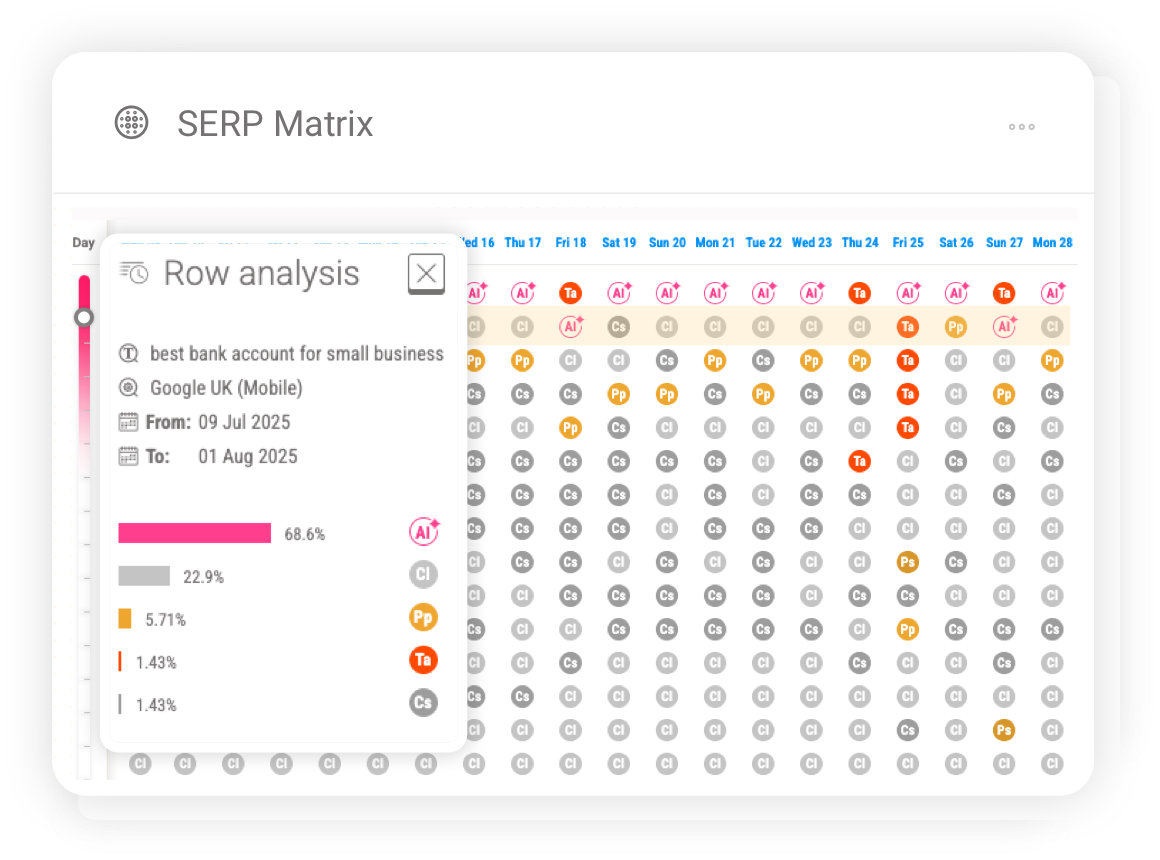
Image source: SERP example from Pi's SERP Feature tracking tool
What's on a SERP?
Most SERPs today combine three types of result.
1. Organic results. These are the unpaid listings, each with a title, URL and short description. Pi calls them "classic links." They're still the foundation of search visibility.
2. Paid results. Ads appear at the top, at the bottom or inside shopping units, and are labeled as sponsored.
3. SERP features. These are the results that go beyond a standard link. Some of the most common:
- AI Overviews. In Pi's glossary, "an initial, AI-generated answer made up of synthesized content that appears at the top of Google's standard search result links." AI Overviews link to the sources they draw on. Read more about AI Overviews.
- Featured snippets (answer cards). A short answer pulled from one page and shown at or near the top of the results. See our guide to featured snippets.
- People Also Ask. A box of related questions that expand to show answers. It's a useful source of real questions for content planning. See how to use People Also Ask.
- Video and image results. Carousels and packs, often led by YouTube and social creators rather than brand websites.
- Shopping and product results. Popular Products and product listings for commercial searches.
- Local pack. A map with nearby businesses for location-based searches.
- Knowledge panels and sitelinks. Entity information and extra links under a strong result, usually for brand searches.
- Top Stories and discussions. News and forum content for timely or opinion-led searches.
For more information on SERP features, visit our SERP feature guide.
What's the difference between a SERP and a SERP feature?
The SERP is the whole results page. A SERP feature is one element on it that goes beyond a standard link, such as a video carousel, a local pack or an AI Overview.
Pi tracks more than 30 SERP features. For the full list, with examples and advice on how to optimize for each one, see our SERP features guide.
Is AI Mode part of the SERP?
AI Mode is a separate, conversational search experience in Google. It isn't a feature on the classic results page in the way an AI Overview is. You open it as its own mode, ask a question in natural language and get a synthesized answer with links, then ask follow-up questions. Behind the scenes it breaks your question into several related searches (a "query fan-out") and pulls the results together. AI Mode has been available in the UK since July 2025.
So AI Mode isn't a feature on the SERP, but it is part of the same search landscape. It draws on many of the same sources, and SEO teams need to track it alongside classic results. Pi's AI Overview vs AI Mode webinar compares the two.
Why do SERPs look different for different people?
Two people searching the same words can see different SERPs. The main reasons:
- Search intent. Informational, commercial, navigational and local searches trigger different layouts.
- Location and language. Results change by country, city and language.
- Device. Mobile SERPs often show features in a different order from desktop.
- Personalization and history. Previous searches and signed-in activity can shape results, especially in AI experiences.
- Time. News, seasonal demand and Google updates change the page from week to week.
That's why a single "rank" never tells the whole story. You need to see the page the way your audience sees it, in the markets and on the devices that matter to you.
How SERPs have changed with AI
For years, the SERP was mostly links. That's no longer true. As Jon Earnshaw, Pi's co-founder, put it in a July 2026 webinar: "Back in the day, we had one chance at getting a blue link for one page on one query." In the same session he said "the SERP is richer than it has ever been, and we've got more surfaces to target."
Three shifts stand out.
1. More features, more formats
Video, images, forums, shopping units and AI answers now compete for the same space. In a short on SERP features, Jon said the question has changed: "not am I on page one, but how many doorways have I opened into my content ecosystem on page one."
2. Zero-click results
When the answer appears on the SERP itself, the searcher may not need to click. Pi's glossary describes a zero-click SERP as one where a user "receives the answer in a synthesized form directly on the page." That doesn't mean clicks disappear. As the glossary video says, "there's plenty of clicking still going on." But it does mean that being cited or mentioned on the page matters, not only being clicked.
3. From results to conversations
With AI Mode, search becomes the start of a conversation. People ask longer questions, get a synthesized answer and follow up. Your brand needs to be there not just in the first answer, but as the conversation develops.
Why the SERP matters for visibility
The SERP decides how much of your audience's attention you can earn. If a search shows an AI Overview, a video carousel and a product pack before the first organic link, being number one in the organic results gets you less than it used to. On the other hand, every feature is another way in.
Classic SERPs still matter in the AI era, because AI answers draw on the same signals that drive classic rankings. In Jon's words: "If you fail to get good organic visibility in classic SERPs, if you're not sending out the appropriate quality signals of double E-E-A-T, helpful content for example, you will have absolutely no chance of getting into that conversation, let alone staying in there."
How to analyze a SERP
Before you create or update a page, look at the SERP you want to win.
- Search the term in the right market and on the right device. Use the country and device your audience uses.
- Note the layout. Which features appear, and in what order? Is there an AI Overview? A video carousel? Products?
- Read the intent. What type of page ranks: guides, category pages, product pages, comparisons? That tells you what Google thinks people want. (This is step 4 of our keyword research process.)
- Check who wins each feature. Your real competitors on the SERP may be publishers, forums or YouTube creators, not just rival brands.
- Look for your own conflicts. Are two of your pages competing, or is a feature pushing your link down? See SERP feature cannibalization.
- Decide the format. If the SERP is full of video, a text-only page may not be enough.
Doing this by hand works for a handful of terms. For an enterprise site with thousands of keywords across several markets, you need tracking.
How to track SERPs with Pi
SERP tracking has two layers.
Rank tracking measures where your pages appear in the organic results over time. Pi's rank tracking does this daily across markets, locations and devices, and the Position Explorer shows how positions and ranking URLs change.
SERP feature tracking shows which features appear for your keywords and who owns them, including traditional features and AI results such as AI Overviews. Pi's SERP feature tracking includes:
- SERP Radar, which shows which features dominate your market across your tracked keywords, and how visible each site is within them.
- Feature Visibility Timeline, which tracks how the visibility of each feature changes over time, so you can spot growing formats like video-led content and AI features.
- Feature Explorer, which digs into the pages, domains and creators winning each feature.
- SERP Matrix, which shows how the makeup of a search term's results page changes over time, so you can see intent and layout shifts.
- People Also Ask Explorer, which shows the questions Google believes your audience is asking, and who currently answers them.

Image source: Pi Datametrics SERP Feature Tracking, SERP Matrix
In this walkthrough, we show how Pi's SERP feature tools work together.
What comes next for the SERP
Search is moving in stages. Classic results find pages. AI Overviews summarize answers. AI Mode conversations explore a problem. And, still emerging, AI agents compare options and act for the user. In the US, Google already lets shoppers check out from some retailers inside AI Mode and Gemini, and it launched Universal Cart in October 2026. Most of that isn't available in the UK yet.
The SERP isn't going away. It's becoming the starting point for longer journeys. Brands that understand every part of it, from classic links to features to AI answers, will be best placed as agentic AI changes how people search.
See the features shaping your market.Explore Pi's SERP feature tracking or book a demo, or watch Pi's Product Demo Series: SERP Features.



Never miss a post
Join our mailing list and have our SEO news delivered straight to your inbox.