How to do keyword research: a 7-step process
By Jon Earnshaw|02 Nov 2026|11 min read
Somebody searches for "best blazers for summer." Then they ask a question about fabric.
They add a budget, compare a few options and decide what suits them. That search has become a conversation.
The keywords still matter. Absolutely. But we also need to understand what people are trying to do and what helps them make a decision.
I'll take you through seven steps, using Pi's keyword research tool, AI and Pi's GPTs. The GPTs sit in a library inside the Pi platform, and each one opens in ChatGPT, where it runs. By the end, you should know which topics to focus on, which pages need improving and what to do next.
The seven steps at a glance:
- Define the audience, market and decisions
- Discover terms and questions
- Organize the terms into groups
- Check intent and compare your coverage with competitors
- Analyze demand, seasonality and commercial opportunity
- Turn the findings into a prioritized content plan
- Measure progress and extend the research into conversations
What is keyword research?
Keyword research, sometimes called keyword analysis, identifies the terms and questions people use to find information, products and services, then analyzes them to decide where a business should focus. It brings together relevance, intent, demand, competitor coverage and existing performance.
Include broad short-tail terms, specific long-tail searches and questions. For an enterprise team, the challenge is turning that coverage across categories and markets into a structure people can work with.
In this short video, I explain why keywords are still important in the age of conversation.
1. Define the audience, market and decisions
Start with what the research needs to achieve. Are you launching a range, improving a category or finding gaps in your content? Set the country, language and audience before building the dataset.
List the products and services you offer, then look beyond their names.
What problems do customers need to solve? What do they compare? What could prevent them from buying?
Use customer questions, sales conversations and your existing search data to establish those needs.
Take "best blazers for summer," the example I use when discussing conversational search. The topic can include fabric, fit, occasion and budget. These are useful research directions because they describe requirements behind the purchase.
Write a brief that an analyst or an AI assistant could work from: the market, audience, relevant categories, customer needs and exclusions. This helps keep discovery focused.
2. Discover terms and questions
Use several starting points. Your website and product categories provide seed terms. Google Search Console shows queries for which your site receives impressions.
Customer questions suggest language and concerns your navigation may miss. Competitor pages provide additional topics to investigate.
Use a keyword research tool, such as Pi's keyword research tool, to expand those starting points and examine demand. In Pi's Search Term Discovery, search by seed terms (up to 15) or by a root domain or URL path.

Image source: Pi's Keyword research tool
Choose the market and refine the results with include and exclude terms, volume and CPC ranges, positions and SERP features. Each result shows search volume, trend, CPC, competition and the likely intent behind the search.
The volumes and positions in Search Term Discovery are estimates from a third-party provider, so treat them as a starting point. Once you have the terms you want, add them to a workspace to track them properly (more on that in step 3).
Use AI alongside this discovery work to explore alternative wording, related needs and questions. Give it the brief from step 1, rather than asking for a generic list of keywords.
For example: "Suggest topics and search questions for UK customers choosing a summer blazer. Cover fabric, fit, occasions and budget. Group the ideas by customer need, and identify any assumptions I should check."
Take useful suggestions back into your research tool. Check relevance, available search demand and the results shown. AI-generated ideas are candidates to investigate; they do not establish that people search for those exact phrases.
For questions, look at People Also Ask. Once your terms are tracked, Pi's People Also Ask Explorer shows the questions appearing in the results for them.
Keep the relevant terms and the data you need to assess them. Remove duplicates and irrelevant meanings, but retain specific questions that matter to the customer even when their search volumes are small.
In this short video, we look at why Google Autocomplete predictions sit closer to searchers' intent than big trophy terms.
3. Organize the terms into groups
You can quickly end up with hundreds or thousands of search terms. Now you need to make sense of them.
Which belong together? Where have you collected ten versions of the same question? Which customer needs are you missing?
Put related terms into clearly named groups so you can see what each topic covers. This is one of the jobs AI can help with. Pi's Group Creator GPT takes a CSV of search terms, from Search Term Discovery or another source, checks the file structure and sorts the terms into balanced, clearly named groups by theme.
It also suggests a concise workspace name. Review each group and its term count, then download the import-ready CSV and bring it into Pi as a workspace for search engine tracking or for LLM and AI model tracking.
Check whether the groups reflect your customer's needs. Split a group if it covers too many different subjects, and look for important questions that have been missed.
If you're working directly in Search Term Discovery, you can also build groups there: select the terms, choose "Apply selection to" and then "Create workspace" or "Add to workspace," and tag them into search term groups. Those groups become the structure for your tracking, competitor analysis and reporting.
Then decide which pages should address the searches. A group of keywords does not automatically mean you need a new page.
4. Check intent and compare your coverage with competitors
Now investigate what each priority group requires. Look at the search results: are people being shown category pages, products, advice, comparisons or videos? Review SERP features as well as the pages appearing.
The Intent column in Search Term Discovery gives you a first read. Once terms are tracked, Pi's Feature Explorer shows which SERP features appear for each group, and the SERP Feature Radar helps you spot when the intent behind a term changes.
"What fabric is best for a summer blazer?" may need an explanation or comparison. A specific linen blazer search may need a product page. Similar vocabulary does not mean the same content will serve both needs.
Competitor keyword research
Identify your search competitors across the topic. These may include retailers, publishers and specialist advice sites, alongside familiar commercial competitors. Pi's Competitor Discovery shows the top 20 sites across the search term groups you choose, so you can see who you actually compete with in search and add them to your workspace.
To research the brands in a market, Pi's Brands & Categories Discovery GPT needs only a business category and a country. It identifies the top 10 brands in that market, then expands each brand into the kinds of questions people commonly ask when researching it, with every brand and query on its own row. Download the CSV, which is formatted for Pi, and use it to create workspaces for search engine and AI visibility tracking.
In Pi's Search Term Discovery, investigate a competitor's domain or relevant URL path, narrow the dataset to your categories and examine the terms and returning pages. Compare that coverage with your own: which needs are missing, and where do you already have a suitable page that needs development? Run the same search on your own domain and filter to positions 11 to 20 to find terms where you are close to page one.
Record the intended page for each opportunity. Closely related searches may belong on one strong page.
Check for overlapping pages before adding more content, and investigate whether clearer themes or internal links would help. In Pi, the Position Explorer Chart and Conflict Detector show when more than one of your URLs is ranking for the same term.
In this short glossary video, we explain keyword cannibalization and how to fix it.
5. Analyze demand, seasonality and commercial opportunity
A search volume figure helps you assess demand, but timing and context matter. Look at how demand changes across the year and how related categories behave. A seasonal peak can affect when the team needs to begin work.
Pi's Search Volume Timeline shows how demand for each category has moved over time. You will find it under Advanced metrics > Market Analysis > Search Volume, and it works from a Market Intelligence view of your groups. AI can then help explain what you are seeing.
Export the Search Volume Timeline as a CSV and give it to Pi's Historical Search Demand Narrative GPT. It picks out the most important month-on-month and year-on-year movements, shows which categories are growing, declining or seasonal, and how categories move in relation to one another. It also gives directional assumptions for the next three and six months and summarizes headline metrics from previous years, all in a concise four-part narrative you can share with stakeholders.
To look further ahead, Pi's Forecasting Demand GPT takes a CSV of monthly search volume by category (you can get this from Search Term Discovery) and projects demand for the next 12 months: expected peaks and troughs, seasonal patterns and periods of growth or decline. The forecast is added to your historical data, so you get one continuous view, plus a written analysis of trends, seasonal events and relationships between categories.
Then bring demand back to the business. How relevant is the topic? What do you offer?
How strong is your current visibility? What work would an improvement require? High volume alone does not make a topic your best opportunity.
This is where commercial value comes in. Pi's Market Intelligence weights demand by value using Pi's Organic Value Score, and the Share of Voice tool shows how your share of each category compares with the leaders. A smaller category where you already sit on page two can be worth more than a big one you are nowhere near.
6. Turn the findings into a prioritized content plan
Give each opportunity an action: improve an existing page, create content or investigate further. Include the reason, timing and owner. Prioritize using relevance, demand, current visibility, competitor coverage and the resources needed.
AI can help organize a draft plan, provided you give it the evidence and constraints. Pi's 12-Month Content Planner GPT uses three CSV exports from Pi, taken from the tables rather than the charts: Search Volume Timeline for demand and seasonality, Feature Visibility Timeline for the search features present, and Visibility Index Timeline (group view) for your relative strength by category.
If you're not sure how to get them, select "How do I get these three CSVs?" in the GPT. It builds a stepped 12-month plan that looks ahead, so a topic expected to peak later in the year is scheduled earlier, and it shows whether to create new content or develop what you already have.
Review the recommendations against your website, your priorities and your capacity before assigning work, and begin seasonal work before demand is expected to rise.
7. Measure progress and extend the research into conversations
Record your starting performance and monitor the terms, groups and pages you have prioritized. Review visibility alongside relevant traffic and conversion outcomes.
Examine whether a change improves coverage across a topic, rather than only one term. Pi's Visibility Indexes let you track each search term group against your competitors over time.
Revisit the research when demand, products or competitor coverage changes. New queries and customer questions can reveal needs missing from the original dataset.
From search demand to conversational intent
Keyword demand and audience questions provide a starting point. From there, explore how people might clarify their needs, compare options and ask follow-up questions.
Can you ask AI to do keyword research?
Yes, as a helper. Give AI a clear brief and it can suggest alternative wording, related needs and questions, and help sort terms into groups. Its ideas are candidates to investigate, not proof that people search for those exact phrases, so take them back into your research tool and check the demand.
Using AI to help with keyword research is a separate task from researching prompts for AI search. One assists your research process; the other defines the conversations you want to understand.
Go back to "best blazers for summer." What happens after that first search? Someone asks about materials, explains where they will wear the blazer or adds a budget.
Each question tells us more about what they need. We want to understand how that conversation develops.
At Pi, we call this conversation mapping. We build sets of prompts that together map a topic and simulate a conversation across multiple turns. We can then examine where your brand appears, where it is missing and where competitors gain an advantage as the conversation develops.
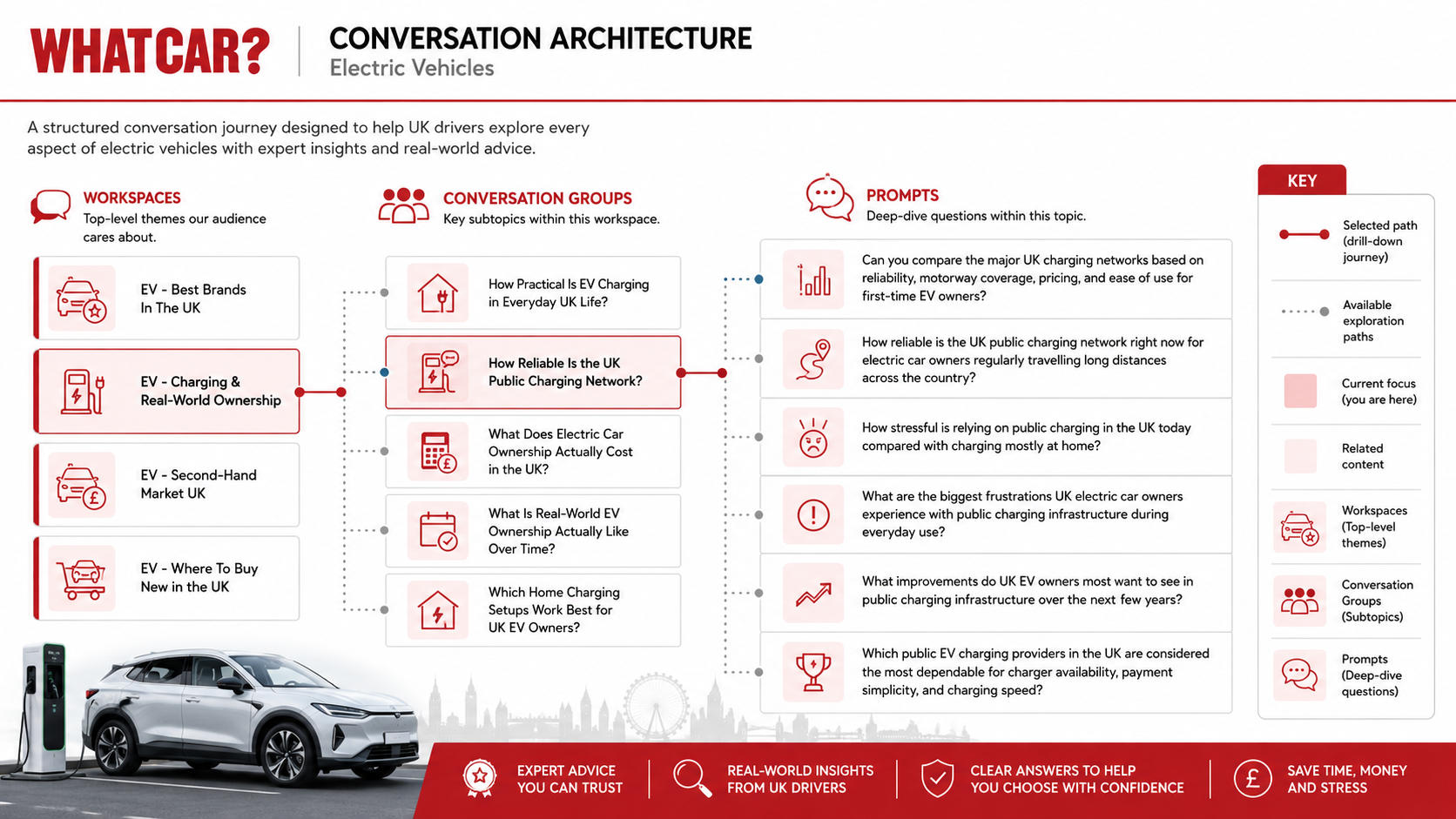
Image source: Pi's prompt research tool, what prompts should I track?
Conversation Builder, a feature in the Pi platform, helps you start that map. It first works out your website topic, audience and any strategic goals.
It then builds the conversation architecture, typically five conversation groups that cover the topic with minimal overlap, and writes natural, varied prompts for each group that model complete multi-turn journeys.
In this short glossary video, we explain conversation mapping.
To learn how those conversations are tracked and how far to trust the data, read What is prompt tracking? For choosing which conversations to monitor, read What prompts should I be tracking for LLMs?
What to do next
Finding an opportunity is useful. Knowing what to do next is what turns the research into action.
Explore Pi's AI Prompt and Keyword Research tool to connect discovery with visibility and competitor analysis.
Track the performance of your content
Demo the software

Never miss a post
Join our mailing list and have our SEO news delivered straight to your inbox.