
A website migration can create the foundations for stronger search performance, an improved user experience and greater commercial returns. It can also undo years of work remarkably quickly.
The difference is rarely the migration itself. It is the strategy, data and implementation surrounding it.
For enterprise sites, migration is not simply a technical exercise or a list of URLs to redirect. It can change how search engines interpret your content, how authority moves through your site and which pages appear for commercially important searches. Even when a launch looks technically successful, lost internal links, conflicting pages or weakened content signals can gradually reduce visibility.
This guide explains how to plan, implement and measure an SEO website migration. It takes you through the work required before, during and after launch, with a complete checklist you can use to manage the process.
Planning a website migration? Pi can help before, during and after launch.
Explore Pi’s SEO servicesWhat is an SEO website migration?
A website migration is any significant change to a website that could affect how search engines crawl, index, understand or rank it.
This includes changes to a site’s domain, platform, structure, URLs, content, internal linking or design. Some migrations affect the entire website, while others involve a particular market, subdomain, subfolder or group of pages.
An SEO website migration is the process of managing those changes while protecting, transferring and ideally improving the site’s existing search value.
That value is broader than traffic. It includes the authority associated with established URLs, visibility across commercially important topics, rankings and SERP features, internal and external links, conversion potential, and the relationships between pages, categories and markets.
A technically complete migration is not necessarily a successful migration. Success means users and search engines can reach the correct new pages, the right URLs inherit the relevant signals, and the business can understand what has changed.
Common types of website migration
- Domain migration: Moving from one domain or top-level domain to another
- Platform or CMS migration: Moving to a new content management or ecommerce platform
- Hosting migration: Moving the site to different infrastructure
- Structural migration: Changing the architecture, navigation, taxonomy or URL hierarchy
- Subdomain or subfolder migration: Moving content between subdomains, subfolders or regional structures
- Site consolidation: Combining several websites or sections into one
- Content migration: Consolidating, removing or reorganizing a significant volume of content
- Website redesign: Changing designs or templates in ways that affect content, links, rendering or performance
- Protocol migration: Moving from HTTP to HTTPS
Not every migration changes URLs. Any change that affects content, rendering, internal linking, indexability or site architecture can still affect SEO and should be managed accordingly.
How long does it take to migrate a website?
There is no single website migration timeline. A simple technical cutover might happen in a few hours, while the complete migration project can take several weeks or months.
The timeline depends on the size and complexity of the site, the number of markets and languages involved, the quality of the existing setup, the number of URLs affected, development resources and the scale of the proposed changes.
A realistic plan should distinguish between four periods:
- Planning and preparation: Defining objectives, researching the search landscape, auditing the current site and establishing benchmarks
- Development and testing: Building the new site, mapping URLs, transferring content and resolving staging issues
- The technical cutover: Publishing the new site and activating redirects and configurations
- The migration window: Monitoring how users and search engines transition from the old site or URLs to the new ones
Search engines need time to recrawl old URLs, follow redirects, index new pages and reassess their signals. Google advises that most pages on small to medium-sized sites can take several weeks to move, with larger sites taking longer.
Temporary movement does not automatically mean the migration has failed, but it must be monitored. The work completed before launch determines how quickly your team can distinguish an expected transition from a genuine problem.
Five essential website migration tactics
A complete website migration plan can contain hundreds of individual checks. In this short video, I explain the five essential tactics that should inform every migration strategy:
- Document and benchmark existing performance
- Research your search landscape
- Optimize the existing and new sites
- Map your internal links
- Create and test your redirect map
These five tactics shape much of the preparation covered below. They are not the entire migration process. A successful migration also requires clear ownership, thorough pre-launch testing, a controlled switchover and close monitoring throughout the migration window.
Stage one: Before the website migration
Most migration SEO work should happen before launch. This is when you can protect existing value, improve the proposed site and prevent known problems from being transferred into the new structure.
Build your SEO migration strategy
A successful migration starts with a strategy that connects the technical change to its business purpose.
Be precise about what is changing and why. Are you improving site performance, consolidating several properties, moving to a more capable platform, simplifying an international setup or changing the brand domain?
Document the business objective, areas and markets affected, what will and will not change, dependencies, success measures, known risks and proposed timeline. Changing the domain, platform, design, content and architecture simultaneously makes it much harder to identify the cause of any performance movement. Where practical, separate major changes or test them in controlled phases.
Appoint a migration owner
Every migration needs a named owner with the authority to coordinate teams, manage risk and make decisions when problems arise.
The wider team may include SEO, development, content, UX, analytics, ecommerce, paid media, CRM, legal and senior stakeholders. Each team should understand its responsibilities, dependencies and sign-off points.
SEO must be involved early enough to influence the new site, rather than being asked to check it immediately before launch. Pi’s SEO migration support works alongside internal teams from planning through implementation and measurement, bringing search data into decisions before they become expensive to reverse.
Define success and manage risk
Success should reflect the purpose of the migration and the value of the existing search landscape. Measures could include protecting priority topics, transferring performance to the intended new URLs, maintaining conversions and revenue, reducing conflict, improving Core Web Vitals or strengthening underperforming categories.
Avoid relying on one domain-wide metric. Stable overall performance can hide serious losses within an important market, category or page type.
For each material risk, document its potential impact, how it will be prevented, how it will be detected, who will respond and what that response will be. Agree rollback criteria before launch and choose a historically quieter launch period where possible. For particularly large migrations, consider a practice run, controlled pilot or phased rollout.
1. Document and benchmark existing performance
Before deciding where content should move, understand what the existing site achieves and what the business stands to lose.
Capture data far enough in advance to understand normal trends rather than relying on one pre-launch snapshot. Benchmark search visibility, ranking URLs, branded and non-branded performance, organic traffic, conversions, revenue, indexation, crawling, Core Web Vitals, backlinks, SERP features and existing URL conflict.
Segment the data by market, category, device, template and page type. If one international market or product category declines after launch, you need to see it immediately rather than wait for the change to affect an overall average.
Pi’s daily keyword rank tracking provides a detailed pre-migration benchmark at URL and topic level. Teams can share this through SEO dashboards and reporting, while Organic ROI helps connect visibility changes to potential traffic and revenue.
2. Research your search landscape
Keyword research is part of migration planning, but it should not become a list-building exercise. Research the complete search landscape around your products, services and audience needs.
Identify what each existing page targets, where the site holds authority, which competitors have the strongest visibility and which valuable opportunities are not yet being captured. Look below the leading positions too. A page with modest traffic today may sit just outside the strongest results for a commercially significant topic.
The research should determine which page should own each important search intent, which pages support it, where URLs compete, what content types succeed and which markets or categories carry the greatest opportunity.
This leads to a crucial question: are you transferring the search value of the existing site, or simply transferring its pages?
Pi helps teams map the search landscape at scale, compare competitors and identify the topics and opportunities that need protection. This intelligence should inform architecture, content decisions and URL mapping before development is finalized.
Create a complete URL inventory
You cannot protect or redirect a URL you do not know exists. Build the inventory from a complete crawl, XML sitemaps, CMS exports, Google Search Console, analytics, server logs, backlink data, campaign landing pages, subdomains and legacy domains.
Include orphan pages that are not linked through the main navigation. Depending on the migration, you may also need images, videos, PDFs, JavaScript, CSS and other established asset URLs.
For every page, record the current and proposed URLs, page type, indexability, status, canonical target, performance, backlinks, internal links, market, language and migration action. Decide whether it should be retained, improved, consolidated or removed.
Do not judge a page only by current traffic. It may hold backlinks, support another page through internal links, perform seasonally or represent a valuable future opportunity.
3. Audit and optimize the existing and new sites
A migration transfers weak signals as easily as strong ones. Identify existing problems before launch so they can be resolved deliberately rather than reproduced.
Compare the existing and proposed pages. Review their purpose, content, titles, descriptions, headings, structured data, indexability, canonicals, hreflang, internal links, breadcrumbs, images, rendering, Core Web Vitals and page speed.
A redesign can appear visually complete while removing much of the content and structure that supported performance. SEO and content teams should review templates and wireframes before development is complete.
Resolve search conflict before transferring it
When several URLs compete for the same search intent, search engines may continually switch the ranking page. Migrating these pages without a clear plan transfers the conflict into the new site.
Look for products competing with categories, editorial pages competing with commercial destinations, international pages appearing in the wrong market and legacy URLs taking visibility from a preferred page.
Pi’s Keyword Cannibalization Tool identifies the terms affected, pages involved and potential visibility and traffic at risk. This helps teams define the preferred page for each intent before redirect and content plans are finalized.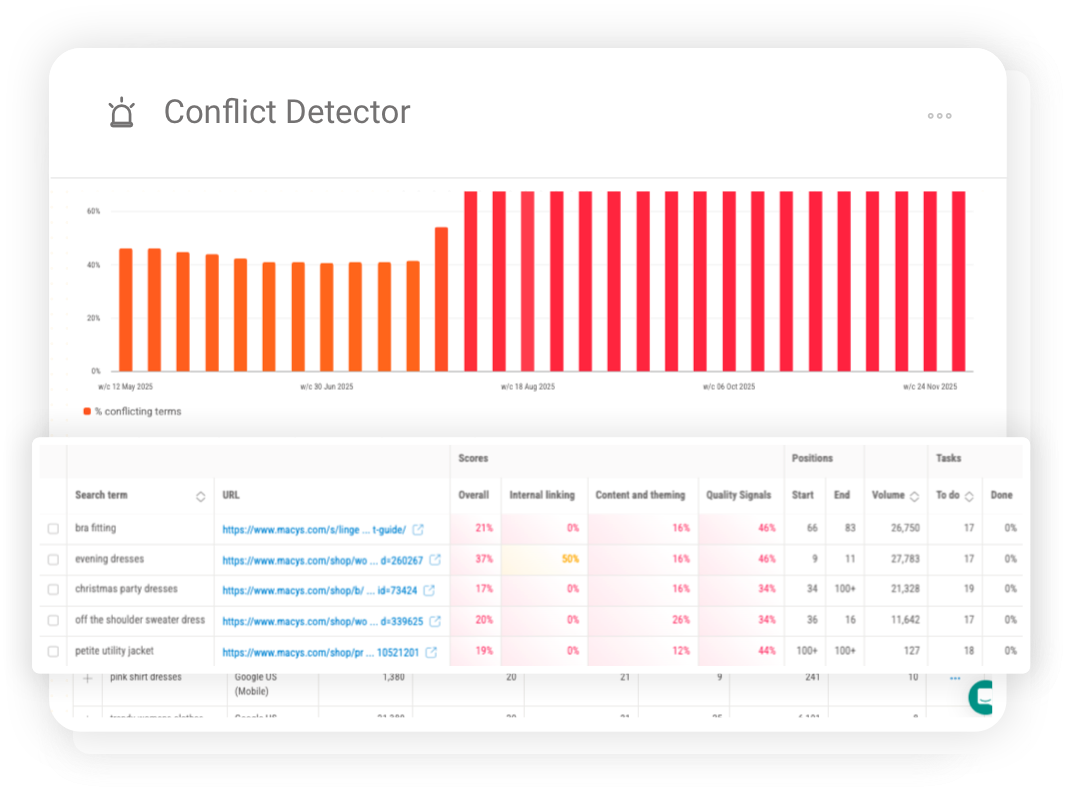
4. Map and strengthen your internal links
Internal links are the connective tissue of a website. They help users and search engines discover pages, communicate relationships and distribute authority.
Map important links on both sites. Ensure navigation, breadcrumbs, body content, related-content modules and footers point directly to the correct new URLs instead of passing through redirects.
Pay particular attention to high-authority pages and commercial destinations. A page can remain live after migration but lose visibility because it sits deeper in the architecture or has lost important contextual links.
For international sites, validate hreflang alongside internal links, canonicals and regional navigation. Pi’s Internal Linking tool helps identify relevant linking opportunities and strengthen signals toward priority pages.
5. Create and test your 301 redirect map
A redirect map records what should happen to every old URL when the migration takes place. It is one of the most important migration deliverables and should be created well before launch.
What is a 301 redirect map?
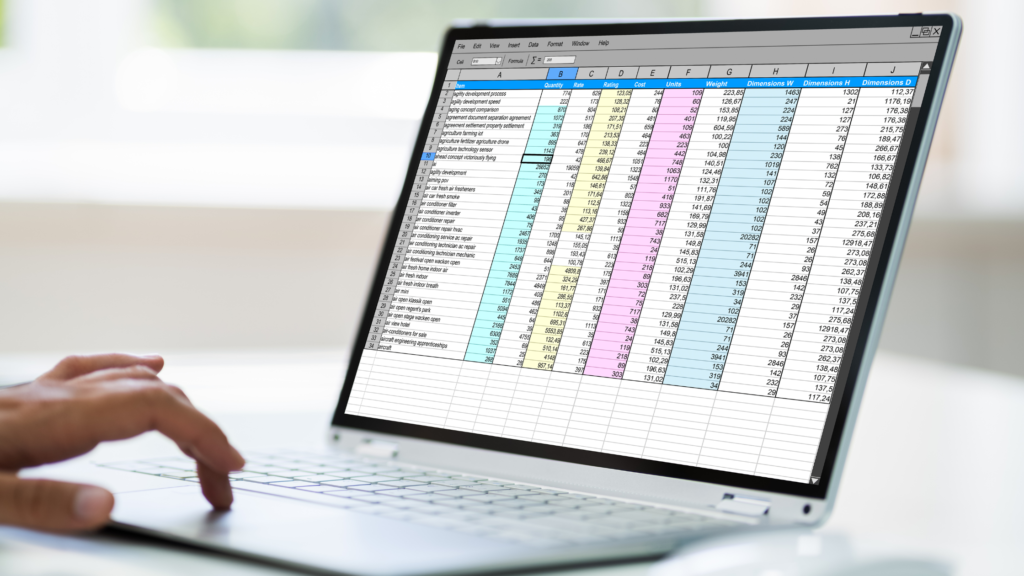
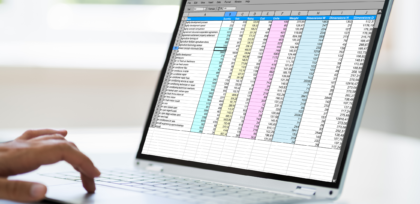
A 301 redirect map is usually a spreadsheet or database matching each old URL with its intended new destination. The 301 status code tells users and search engines that the page has moved permanently.
| Field | Purpose |
|---|---|
| Old URL | The exact source URL currently accessible or indexed |
| New URL | The final destination after migration |
| Action | Retain, redirect, consolidate or remove |
| Redirect type | Normally 301 for a permanent move |
| Page type | Product, category, article or another template |
| Priority | The URL’s business and search importance |
| Rationale | Why the destination was selected |
| Test result | Expected and actual behavior after implementation |
Map by relevance, not convenience
Each old URL should redirect to the closest relevant new equivalent. Do not send large groups of unrelated URLs to the homepage because a direct equivalent has not been created. Search engines may treat irrelevant mass redirects as soft 404s, while users arrive somewhere that does not meet their expectations.
If several old pages have genuinely been consolidated into one stronger resource serving the same intent, they can redirect to that destination. If no relevant replacement exists and the content has no continuing value, a 404 or 410 may be more appropriate than a misleading redirect.
Pi has seen the consequences at enterprise scale. In one migration, hundreds of product pages were temporarily redirected to a homepage using 302 redirects. Search visibility fell sharply because the redirects did not communicate a permanent, relevant page-to-page move. The problem was not the decision to migrate. It was the absence of a complete redirect strategy and properly governed implementation.
Use performance and opportunity data to prioritize the map. The best destination is determined by relevance and search intent, not simply by which new URL looks similar.
Redirect each source directly to its final destination. Test for chains, loops, error destinations, temporary redirects used for permanent changes, case and trailing-slash inconsistencies, protocol and host variations, and internal links that still use old URLs.
Google recommends keeping migration redirects for as long as possible and generally for at least one year. Important redirects may need to remain indefinitely for users and external links.
Test the migration before launch
The staging environment should replicate the intended live site closely enough to support meaningful testing.
Protect staging with server-side access controls, such as login protection and IP allowlisting. Add a temporary noindex directive as an additional safeguard, but do not rely on robots.txt alone: it can prevent crawling without reliably preventing a known URL from being indexed. Record every staging restriction and assign an owner to remove it at launch, because carrying noindex directives, access controls or a restrictive robots.txt file onto the live site can remove it from search.
Crawl staging and compare it with the existing site. Test redirects, canonicals, hreflang, structured data, links, templates, rendering, page speed, forms, analytics, consent tools, feeds and third-party integrations. Prepare XML sitemaps and confirm that the site can cope with increased crawler activity after launch.
Record defects, owners and resolution status. The migration owner should not approve launch while unresolved issues pose an unacceptable risk to indexation, visibility or revenue.
Pi’s SEO specialists can support staging reviews and pre-launch validation, comparing the proposed implementation with the migration strategy and performance benchmark already established in the platform.
Stage two: During the website migration
Migration day should follow a documented sequence with named owners and clear escalation routes.
Manage the migration-day switchover
Before release, confirm the backup and rollback position, make sure specialists are available, pause unrelated changes and take a final crawl and performance snapshot.
During the release:
- Publish the approved site build
- Activate the approved redirects
- Remove staging-only crawl and indexation restrictions
- Confirm the preferred protocol and host resolve correctly
- Check robots.txt, canonicals and hreflang
- Publish the new XML sitemaps
- Verify analytics, forms and conversions
As soon as the site is live, test priority old URLs and their final destinations. Crawl the old URL set and new site, check response codes, confirm internal links point directly to new URLs and test representative templates across markets and devices.
Verify Google Search Console properties. For an eligible domain or subdomain move, submit a Change of Address. Record and prioritize issues immediately rather than waiting for traffic reports to expose a failure.
Pi can provide launch-day SEO support while daily ranking data begins showing whether priority old and new URLs behave as expected.
Stage three: After the website migration
Launching the new site does not complete the migration. The following days and weeks reveal whether search engines have understood the changes and whether the intended value has transferred.
Monitor the migration window
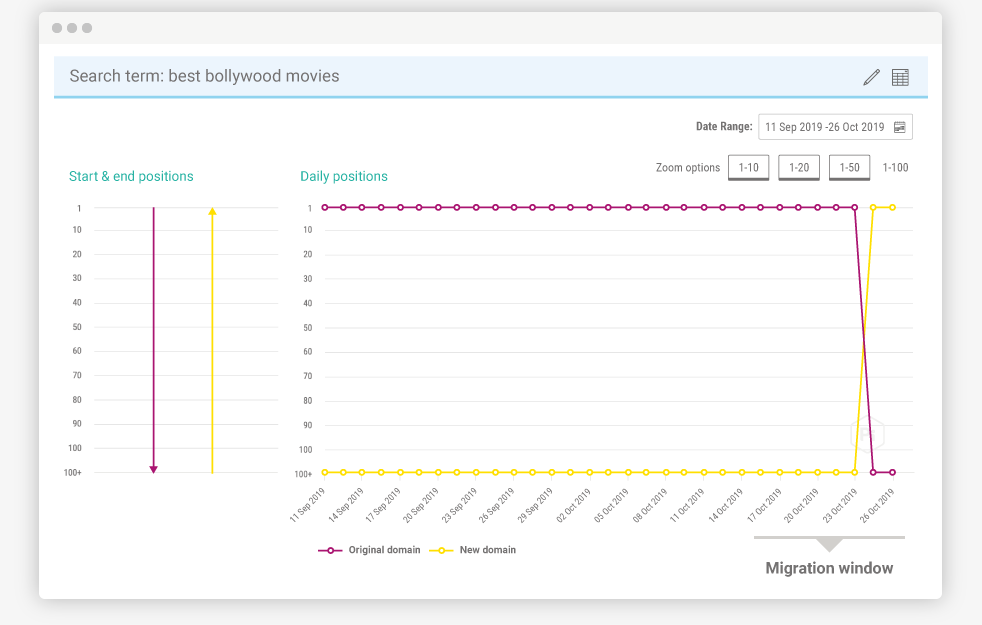
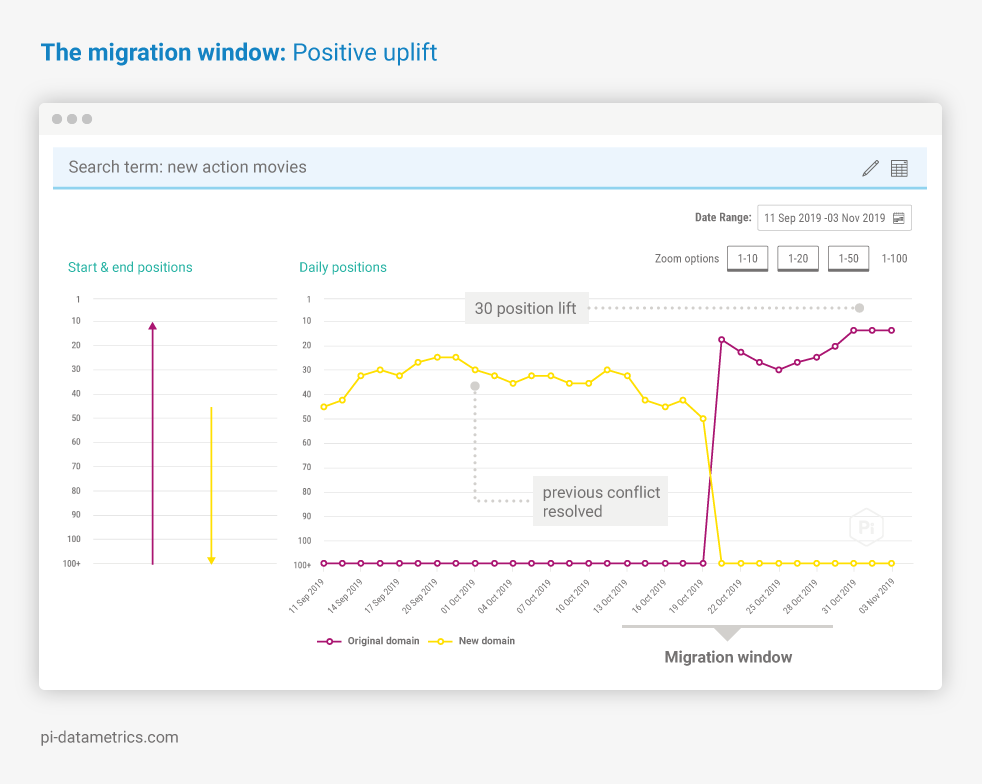
At Pi, we describe the period in which search engines transition from the old site or URL set to the new one as the migration window.
This window begins when the site goes live, but it does not have a fixed duration. Its length depends on site size, crawl behavior, implementation quality, server performance and the scale of the changes.
Several visibility patterns are possible:
- A stable transition: New URLs replace old URLs with limited disruption.
- A delayed changeover: Old URLs remain visible before new URLs take their place.
- A temporary decline: Visibility falls while search engines process the move, then begins to recover.
- URL coexistence or switching: Old and new URLs appear alternately or compete for the same searches.
- A positive transition: Stronger architecture, content and signals allow new pages to improve beyond the old benchmark.
Do not judge these patterns from one overall number. Monitor old and new URLs together and examine performance by market, category, page type and priority topic.
Follow visibility, ranking URLs, crawling, indexation, redirect errors, traffic, conversions and revenue. Compare branded and non-branded performance and check whether competitor or wider SERP changes could also explain movement.
Pi’s Keyword Rank Tracking tool provides daily URL-level data, helping teams confirm when the intended page takes over, spot URL switching and detect losses before they disappear inside aggregated reporting. Automated dashboards give technical teams and stakeholders a shared view of the transition.
Diagnose and resolve migration problems
Migration performance rarely fails uniformly. The pattern and location of change can help reveal its cause.
Visibility declines across the whole site
Check for sitewide noindex directives, restrictive robots.txt rules, incorrect canonicals, widespread redirect failures, server errors, rendering problems and important content removed from shared templates.
One market, folder or page type declines
A segmented decline can point to incorrect hreflang, cross-market internal links, a broken template, missing regional content, inappropriate canonicals or a redirect rule affecting one directory.
In one international subdomain migration analyzed by Pi, unresolved hreflang, internal-linking and cross-market conflicts were carried into the new structure. Around 60% of the monitored non-branded terms showed competing URLs before launch. Visibility disruption appeared within approximately 24 hours and became substantially clearer after 48 hours, with branded and non-branded performance affected.
The early movement was not proof of the final outcome. It was an urgent signal that the migration had not transferred cleanly and needed investigation.
Old and new URLs coexist or switch
Check whether redirects are permanent and live, internal links still point to old URLs, new pages self-canonicalize, XML sitemaps contain the intended URLs and duplicate versions remain accessible.
The wrong new URL begins ranking
This can indicate an inaccurate redirect, unclear targeting, internal links favoring the wrong page, missing content or search conflict. Pi’s Keyword Cannibalization Tool reveals the competing URLs and affected terms, helping teams identify the intended destination.
Traffic holds but conversions decline
Search visibility alone cannot confirm success. Check landing-page relevance, forms, checkout functionality, analytics, page speed, mobile usability and calls to action. Redirects may be sending users to broader pages that rank but no longer meet their needs.
Performance does not recover immediately
Do not assume every decline is permanent or that every site will recover without intervention. Compare movement with the benchmark, confirm the correct URLs are transitioning and fix verified implementation problems promptly.
Commercial impact accumulates while visibility is lost. Recovery time is not the only measure of success. Teams must also consider the traffic, conversions and revenue missed during that period. Pi’s Organic ROI software helps prioritize affected areas by potential commercial value.
Measure migration success
Once the immediate transition has settled, compare performance with the original benchmark. Assess whether intended URLs have taken ownership, priority markets and topics have recovered or improved, and the migration achieved its business objectives.
Document what worked, what failed, how issues were resolved and what still needs optimization. A migration often reveals wider opportunities, including clearer content roles, improved internal linking and gaps within the search landscape.
Pi continues to support this stage through ongoing reporting, conflict monitoring, opportunity identification and expert SEO guidance. The goal is not simply to return to the old benchmark. It is to use the new site as a stronger foundation for future growth.
How Pi Datametrics supports website migrations
Pi combines enterprise SEO services with the Pi search intelligence platform to support the complete migration journey.
| Before migration | During migration | After migration |
|---|---|---|
| Strategy, search landscape research and benchmarking | Launch support and daily visibility monitoring | Diagnosis, reporting and optimization |
| Search conflict and internal-link analysis | Old and new URL comparison | Commercial performance measurement |
| Redirect planning and staging guidance | Early detection of visibility loss | New search growth opportunities |
Our SEO specialists work alongside internal SEO, development and content teams, while the platform provides the continuous evidence needed to guide decisions and measure impact.
Explore Pi’s SEO migration services



Never miss a post
Join our mailing list and have our SEO news delivered straight to your inbox.