
Google AI Mode lets people ask a question in Google, get an AI-written answer with links, and keep going with follow-up questions. A search becomes a conversation. For brands, the question changes from "where do we rank?" to "are we still in the conversation when the customer decides?"
In the video below, I walk through Google AI Mode.
What is Google AI Mode?
Google calls AI Mode its "most powerful AI search experience." In Google's words, you can "ask anything and get an AI-powered response, with the ability to go deeper through follow-up questions and helpful links to the web."
It sits alongside the classic results page and its SERP features. You can ask with text, voice, images or files, and AI Mode is available in the UK, the US and many other countries.
Our glossary video sums it up in under half a minute:
"AI mode is a synthesized answer in Google. Basically, when you ask a question, Google will break your query down, perform a query fan out, synthesize the content that it believes is relevant, and serves up an answer. That is the start for many people of a conversational journey."
How does AI Mode work?
AI Mode doesn't run one search for one question. Google says it uses a "query fan-out" technique. It splits your question into smaller topics, searches for each one at the same time, then pulls the results together into one answer.
In our webinar Same Question, Different World, which Jon Earnshaw and I presented, Jon walked through how Google breaks a question into four or five smaller searches, fans them out, brings the results back and then uses AI to summarize them.
Google also says:
- Answers are backed by web content, to improve accuracy.
- If Google isn't confident in an AI answer, AI Mode may show a set of web links instead.
- AI Mode "doesn't always get it right," and Google asks people to give feedback when it doesn't.
The biggest change is the follow-up. Each new question carries the context of the last one. In the same webinar, Jon showed a search that started with garden furniture for a small patio, then asked follow-up questions about the set and the cost. The brands changed as the conversation went on:
"Will the brands that were there at the first part still be there at the end? Most of them won't be. And that's where the conversion happens."
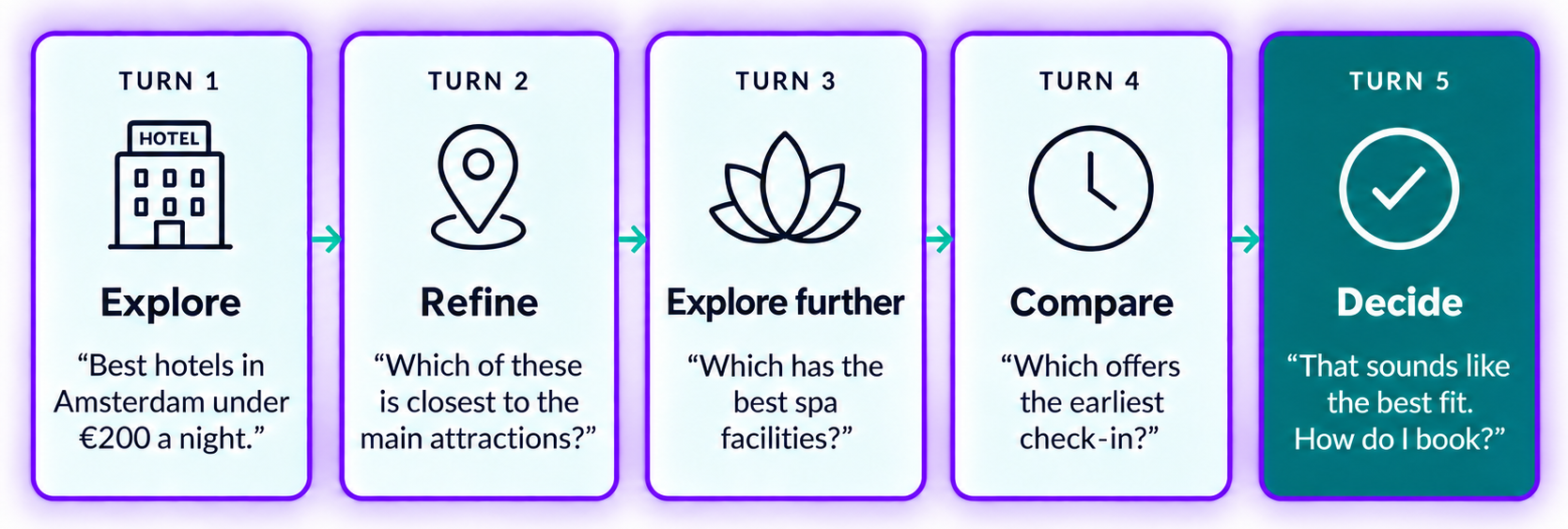
A Google AI Mode conversation over five questions.
AI Mode vs AI Overviews
AI Overviews and AI Mode are often talked about as if they were the same thing. They aren't.
An AI Overview is a summary at the top of a normal results page. Google says it only shows one when it adds something to classic search, so often there isn't one. AI Mode is a separate, conversational experience. Google says it helps most when a question needs "further exploration, reasoning, or complex comparisons." Google also says the two "may use different models and techniques, so the set of responses and links they show will vary."
That matches what we see in the data at Pi. Showing up in an AI Overview is no guarantee you'll show up in AI Mode, and the other way around. Jon made that point in the webinar.
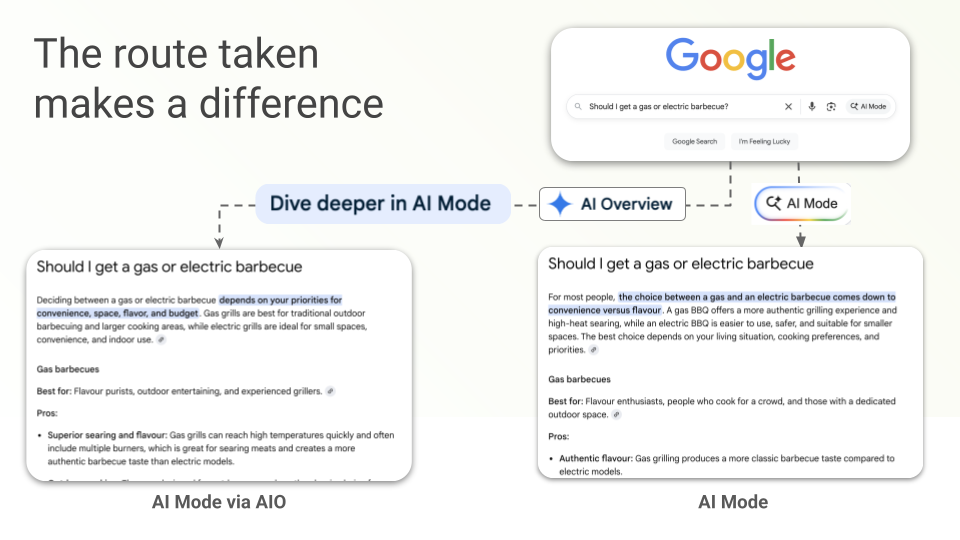
How someone gets into AI Mode matters too. A person can go straight to AI Mode, or start in classic search, read the AI Overview and then click through to go deeper. Jon ran the same question both ways and got different answers. Google already knew what the person had read in the AI Overview, so it didn't repeat it. In his barbecue example, going straight to AI Mode gave a more buying-focused answer with more brands. Going through the AI Overview led to more safety and comparison questions. So when someone asks whether their brand is visible in AI Mode, the honest answer is that it depends how the person got there.
When I use AI Mode myself, I really like the way the answers are presented. I trust them. I can see all those wonderful links that I know SEOs are so happy to see again.
Google AI Mode vs ChatGPT
At Pi, we track thousands of prompts for customers across AI Mode and ChatGPT. In our short video, we picked out three differences:
- Links. AI Mode uses far more links in its response than ChatGPT, typically around four times as many links to your website. That's good news, but it also means more competition for the click.
- Sources. AI Mode leans heavily on user-generated content. Reddit, YouTube, Facebook and Instagram all show up strongly among its most cited sites. ChatGPT uses more traditional authority sites, such as Wikipedia and publishers.
- Sentiment. Because of all that user-generated content, AI Mode is more likely to be negative about your brand. Typically, we see around 68% more negativity in AI Mode compared to ChatGPT.
The two platforms also share a goal. Talking about ChatGPT and AI Mode, Jon's view is that both want to win the agentic race. Both want to keep people inside the conversation, right up to the purchase. Read more in our guides to agentic AI and AI shopping and agentic commerce.
Why AI Mode matters for your brand
Showing up in the first answer is a start, not the finish. In the webinar, Jon asked why we analyze one result when a conversation continues.
The turn that matters most is usually the last one, when the person asks AI Mode to narrow down their options. In our webinar How to Win More AI Citations & Measure Conversation Presence, Jon said:
"It's the final turn of the conversation. If we're not there, it's all a waste."
Google's own advice is that there's nothing special to do to appear in AI Mode. In its guidance for site owners, Google says there are no extra requirements, no special schema and no new "AI text files." A page has to be indexed and eligible to show in Search with a snippet. The usual SEO basics still apply, including:
- Letting Google crawl your pages.
- Making content easy to find through internal links.
- Keeping important content in text form.
- Supporting text with good images and video.
- Making sure structured data matches what's on the page.
Two of those points stand out for AI Mode. The first is video. Jon pointed out that a lot of the synthesized wording you see in an AI Mode conversation is taken from video. The second is internal linking. I still think of it as gold dust. It has been gold dust for years.
How to track Google AI Mode
Pi tracks Google AI Mode. You can see where your brand appears in AI Mode answers, which sites get cited, which competitors show up, and how all of that changes over time. We track it daily through AI Search Visibility and LLM tracking, alongside ChatGPT, Perplexity, Gemini and AI Overviews.
Here's how it works.
See the answers, question by question. Prompt Explorer shows the AI Mode answers for the questions you track, including which brands are mentioned and which domains are cited.
See which sites AI Mode trusts. AI Site Monitoring shows the most cited domains in AI Mode, how often your pages are linked, and how that shifts over time.
See who's in the conversation. AI Brand Monitoring shows the most mentioned brands in AI Mode, so you know whether you're there and which competitors are.
Benchmark your authority. The AI Authority Score gives you one score across multi-turn AI Mode conversations, built from Doorways, Sentiment, Owned Mentions and Earned Mentions, and you can compare it with your competitors.
Know how AI Mode talks about you.Brand sentiment shows the tone of your mentions, not just how often they happen. That matters because AI Mode leans on forums and social content.
Compare AI Mode with ChatGPT. On the dashboard, you can now put AI Mode and ChatGPT side by side, from most cited domains to most mentioned brands. Showing up in one doesn't mean you'll show up in the other.
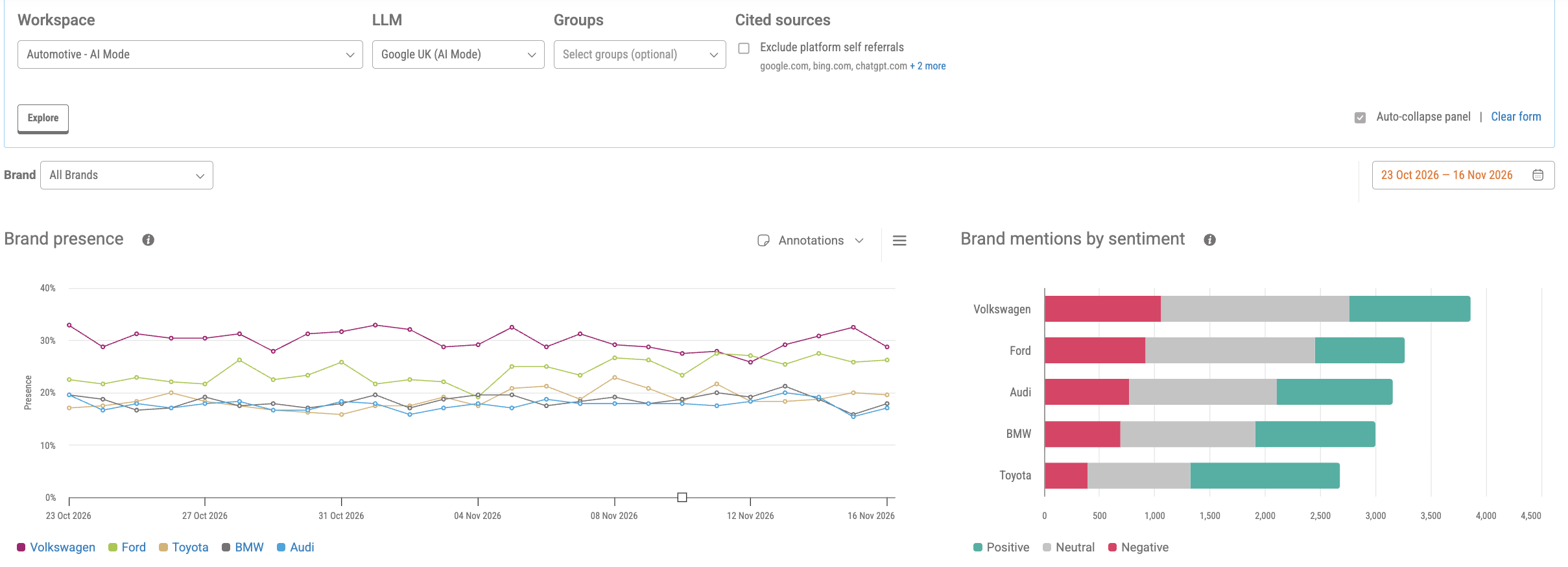
Image source: Pi's Google AI Mode LLM tracking
As Jon put it in our citations webinar, the aim is not to answer a single prompt, but to get involved in the conversation at every step.
Want to see how your brand shows up in Google AI Mode? Book a demo.




Never miss a post
Join our mailing list and have our SEO news delivered straight to your inbox.